


H4 Racing Motion Simulator Platform
H4 Racing Motion Simulator Platform
Couldn't load pickup availability

H4 Racing Motion Simulator Platform
☑️ 3DOF Motion
☑️ 1-Year Manufacturer Warranty
☑️ Assembly Required
☑️ Seat & Controls Sold Separately
Compatible


Total Immersion
Turns your everyday life into a racing experience.
Built to Make Racing Feel Physical
Discover the full potential of our racing rig.
Brake hard and the cockpit pitches forward. Load the car into a corner and your body moves with the roll. Let the rear step out and the platform rotates beneath you as you work to catch it.
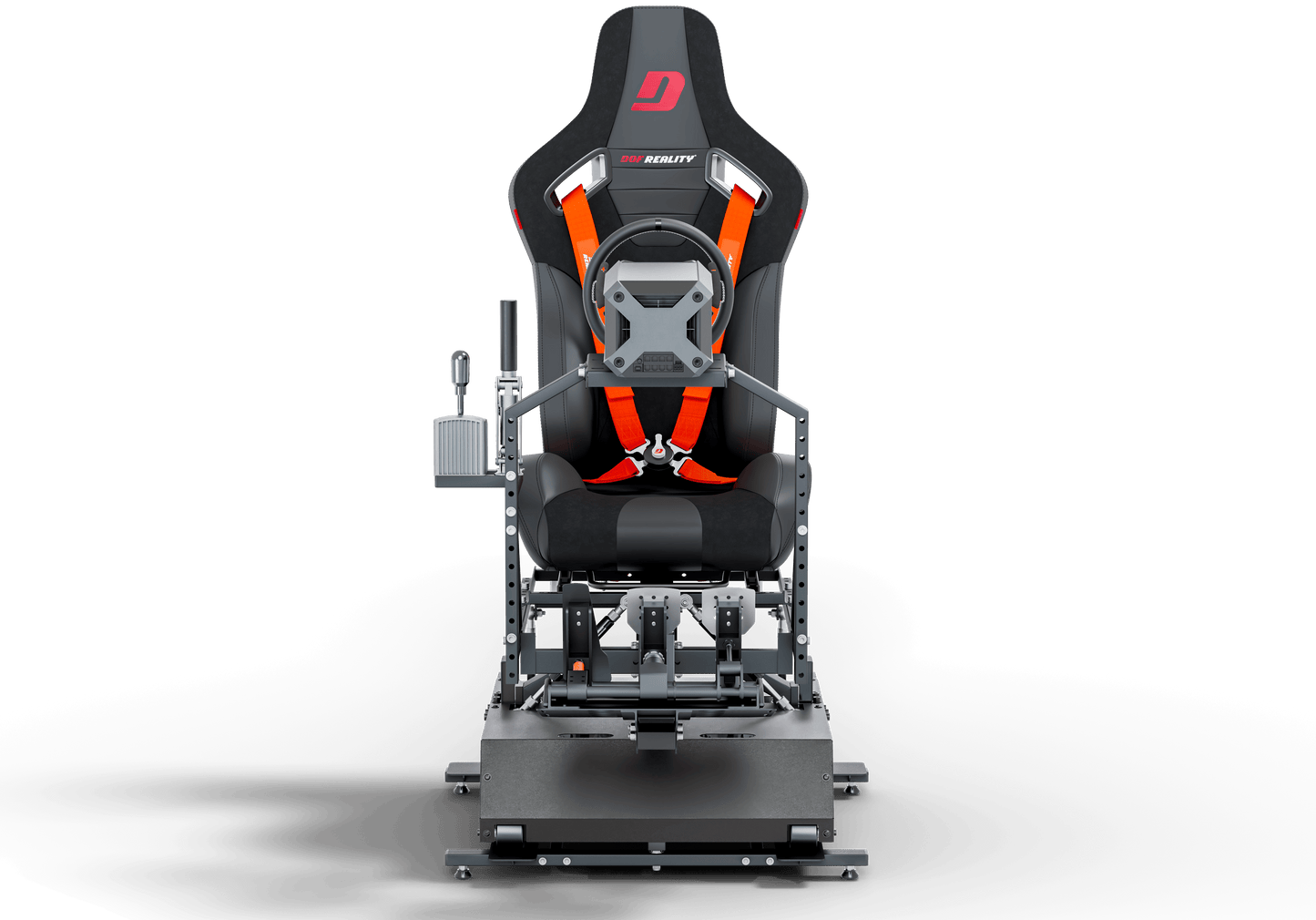
The DOF Reality H3 HERO brings three axes of motion to your racing setup, turning what happens on-screen into movement you can feel through the cockpit.
Unlike systems that move only the seat, the H3 moves your seat, steering wheel, pedals, and mounted controls together. Your hands stay connected to the wheel and your feet stay with the pedals while the entire driving position moves around the race.
The result is simple: braking isn't only something you see. A corner isn't only something you steer through. And losing traction isn't only a change on the monitor.
Your body gets involved.
The H3 uses game telemetry to turn the car's behavior into physical feedback beneath you. Road bumps, surface texture, gear changes, collisions, acceleration, and changes in traction can become movement instead of remaining trapped inside the screen.
With 3 degrees of freedom, the H3 reproduces pitch, roll, and yaw/rear traction movement. Accelerate and the platform can shift with the car. Brake and it can pitch forward. Push past the limit of grip and rear traction movement gives your body another signal that the car is beginning to slide.
And because the whole cockpit moves together, the experience doesn't stop at the seat.
Your monitor shows you the race.
Your speakers let you hear it.
Your wheel lets you fight it.
The H3 gives your body something to react to.
Compare Motion Sim Models
See the differences in motion, features, and price.
| Characteristics | H3 | H4 | H6 |
|---|---|---|---|
| Degrees of Freedom (Axis) | 2 DOF (Pitch + Roll) | 3 DOF (Pitch + Roll + Yaw/Rear Traction) | 4 DOF (Pitch + Roll + Yaw/Rear Traction + Heave) |
| Full Platform Motion | YES | YES | YES |
| Range of Motion | 20° | 20° | 20° |
| Speed | 50 cm/s | 50 cm/s | 50 cm/s |
| Torque | High | High | Very High |
| Acceleration | 1.2 G | 1.2 G | 1.5 G |
| Power Consumption | 300W | 400W | 500W |
| Boxes Weight (Size) | 45 kg | 55 kg | 65 kg |
| Floor Foot Print | 120 x 100 cm | 120 x 100 cm | 130 x 110 cm |
| Material Type | Steel | Steel | Steel |
| Supported Pilot Weight | 120 kg | 120 kg | 150 kg |
| Warranty | 2 Years | 2 Years | 3 Years |
| Upgradable | YES | YES | YES |
| Price | $2,499 | $3,299 | $4,199 |
FAQ
DOF Reality ready-to-play packages include the following:
- Rigid metal rig designed for normal and F1 poses (except M2 models).
- Mounts for wheel, pedals, shifter (except M2 models).
- Mounts for a seat or sliding rails.
- Integrated power drive motors.110/220v control unit with USB.
- SimRacingStudio license.
- Quick assembly tools.
- 1-year full warranty.
Please note, customers are required to purchase their own seat, VR headset, and controllers (wheel, pedals, etc.). Our platform supports all of them.
Yes.
Consoles operate within a closed, controlled, and proprietary platform. Currently, only a select few games, such as Grand Turismo 7, Sport, PCARs, PCARs2, AC, F1, Forza Motorsport 7, and Forza Horizon 4 and 5, send motion data from consoles using UDP over the network (as demonstrated in this video).
For these games, we offer a MagicBox solution priced at $200. To enable motion in all other games, we are developing MagicWheel and MagicPedals, which will be available in two months.
For a list of supported PC and console games, including compatibility with the latest consoles, please refer to our games list.
Seat choice is a matter of personal preference. Almost any bottom-mount car or gaming seat works. We don’t sell seats; you can use your preferred seat or find affordable options locally. We recommend a Bucket Racing Seat to prevent falling during G-forces, and a four-six point harness is optional. A lighter seat enhances platform performance. For options, check eBay (Option 1, Option 2, Option 3), Amazon, or JEGS.
Real certified racing seats can be quite expensive, Ask for seat that is NOT certified for racing – they work the same way and are way cheaper than certified ones. In local classifieds, check for single racing seat. Finally, check the local racing community, they will be happy to help.
The best will be to use standard bottom mount
car seat with sliders/rails (as in real car).It provides you the opportunity for quick adjustments as well.
Most of the bucket seats require side to bottom mounted brackets adapters and sliders.
Our seat mounts: 280mm deep (front to back) and 345mm (13″37/64), 375mm (14″49/64) or 405mm (15″15/16) wide.
Platform weight 130 – 220 lbs (60-100kg).In order to deliver it to your door and ease of transportation all platforms are shipped in two boxes.
Our platforms require assembly. It will make your platform more valuable as well as custom-tailored build for your preferences.It is a simple process that you will enjoy!
The DOF motion platform can be used with any VR headset. There are some subtleties to be considered when combining VR with a motion platform. The motion platform will move the player’s head, which will move the VR headset, which will automatically affect the amount of movement you see in the VR image. Most of the time, the degree of motion is not enough to impact gameplay and can be ignored like in this example video https://youtu.be/oi8yvWzZXVw. If the additional motion of the VR image is too extreme, you might need to turn down the motion of the platform to a lower setting. This will minimize the “hopping/swimming” type of effects in the image and will give you a smoother experience with VR.
Software Solution for Motion CompensationIf the amount of movement in the VR image is too much and you do not want to turn down the motion, you can utilize motion compensation software which removes the platform movement from the VR image. OpenVR Motion Compensation is the current software to be utilized for motion compensation which can be downloaded here: https://ovrmc.dschadu.de/. OpenVR Motion Compensation will track the movement of a tracker mounted on the platform and remove the motion of the platform from the movement of the VR headset. OpenVR Motion Compensation can work with both types of VR headsets (base stations and inside-out tracking).
- OpenVR Motion Compensation Tutorial Video: https://www.youtube.com/watch?v=1MqGO46xdtI&t
- OpenVR Motion Compensation Install and Setup: https://ovrmc.dschadu.de/en/setup
There are primarily two types of VR headsets and they require the tracker to be mounted differently. Ones that utilize base stations (outside-in) for tracking of the VR headset movements such as the Valve Index, HTC Vive Cosmos, Pimax 5k/8k* and the original Oculus Rift (CV1). The other type utilizes cameras in the headsets that provide inside-out tracking which include the HP Reverb/G2, Oculus Quest/Quest 2/Rift S**, Samsung HMD Odyssey+ and other Windows Mix Reality (WMR) type headsets.
For VR headsets that utilize base stations, a tracker or controller (Valve Index Controller, HTC Vive Controller, HTC Vive Tracker) must be mounted on the motion platform and be in-line of sight by all the base stations. It does not matter where the tracker is mounted as long as its visible to all the base stations, though typically they are mounted near the head at the top of the chair.
For VR headsets that utilize inside-out tracking via the cameras on the headset, a controller (Oculus Touch Controller or WMR Controller) must be mounted on the front of the motion platform so it is in-line of sight of the cameras on the headset.
In either case, the tracker must be 1) firmly mounted to the platform and 2) must utilize some type of vibration mitigation. Vibration mitigation can be achieved by 1) adding additional mass/weight to the mount so it absorbs vibration energy and 2) using a vibration absorption material like soft rubber or Sorbothane.
Another potential software solution is the older version of motion cancellation called OpenVR Input Emulator. Though it is no longer being developed, there is still limited support from the community via its download page here: https://github.com/matzman666/OpenVR-InputEmulator/releases.
- HTC Vive/Vive Pro: https://dofreality.com/HTCMotionCancellation.pdf
- Oculus Rift setup: https://dofreality.com/OpenVR.pdf
* For Pimax users, the PiTool can potentially be utilized for VR Motion Compensation: https://www.pimax.com/pages/pitool. In PiTool, turn on a Valve Index controller, select it as the sensor in PiTool “Motion Cancellation’ and open the game. However, support is not guaranteed and may not work properly.
** The Oculus driver for SteamVR is made by Valve and not by Oculus as they only support their own closed eco-system. This causes issues with 1) big motions on Oculus devices might see a black border on the edge of your view and 2) rotation is not always compensated correctly.
Hardware/Non-Software Based Solutions for Motion Compensation
- For VR headsets with inside-out tracking, consider covering one of the cameras with tape. It will prevent the headset movements from being tracked in the environment and provide some VR motion compensation without significant side effects and the need to use motion compensation software: https://www.youtube.com/watch?v=ksy7AxjbcD0
- For the Oculus Rift, attach the sensor the platform using the DOF Oculus mount and cover the cameras on the VR headset. This disables the 3D tracking, which prevents the camera from jumping around in the game. However, this method also disables the rotation tracking, so if the motion platform turns on its yaw axis, you will have to turn your head to look forward in game. It’s suggested to limit the Yaw movement in your motion platform software in order to make the rotation just enough for you to feel but you will not have to turn your head to look forward in the game. This of course is not ideal, but doesn’t require motion compensation software.
- For original Oculus Rift (CV1) users, the Oculus Rift sensor could be mounted directly to your DOF Reality platform to provide simulated motion compensation without the need to use motion compensation software; however, due to recent Oculus update this solution may or may not work. DOF Reality includes a mount for the Oculus Rift sensor in your DOF hardware shipment which should be placed at the front of the platform looking back at the VR headset. Mount the bracket to the two holes at the back of the wheel deck plate so it extends up and out to the front of the platform.
Additional VR Motion Compensation Resources
- OpenVR Motion Compensation Tested Devices: https://ovrmc.dschadu.de/en/testeddevices
- XSimulator Motion Compensation Thread: https://www.xsimulator.net/community/threads/openvr-motioncompensation.14576/
- XSimulator Motion Cancellation Thread: https://www.xsimulator.net/community/threads/vr-motion-cancellation-time-to-test.10241/
- HTC Vive Tracker Mount Example: https://www.youtube.com/watch?v=BPmo5kmk5CY
We are selling the complete platform. Each individual system is assembled, tested, and tuned. They’re disassembled before shipping, so all you need to do is put it together, install provided motion software on your PC, and connect our controller via USB! All parts and tools needed for quick assembly of the platform are included.
Compatible Games
Experience the Thrill of Racing and Gaming in Full Motion with H3 DOF Reality®.


Bottom of the Page and Still Undecided?
We understand that you may have some questions or concerns.
Is it too expensive?
Check out our more affordable models.
Is it difficult to set up?
We’ve got you covered with our FAQs
and Manuals.
Need more details?
Send us a message and we’ll be quick to respond.

The ULTIMATE Experience is Waiting
With our platform, you’ll immerse yourself in unbelievable sensations that you won’t find anywhere else. Don’t wait any longer, buy now and experience the future of simulation!